

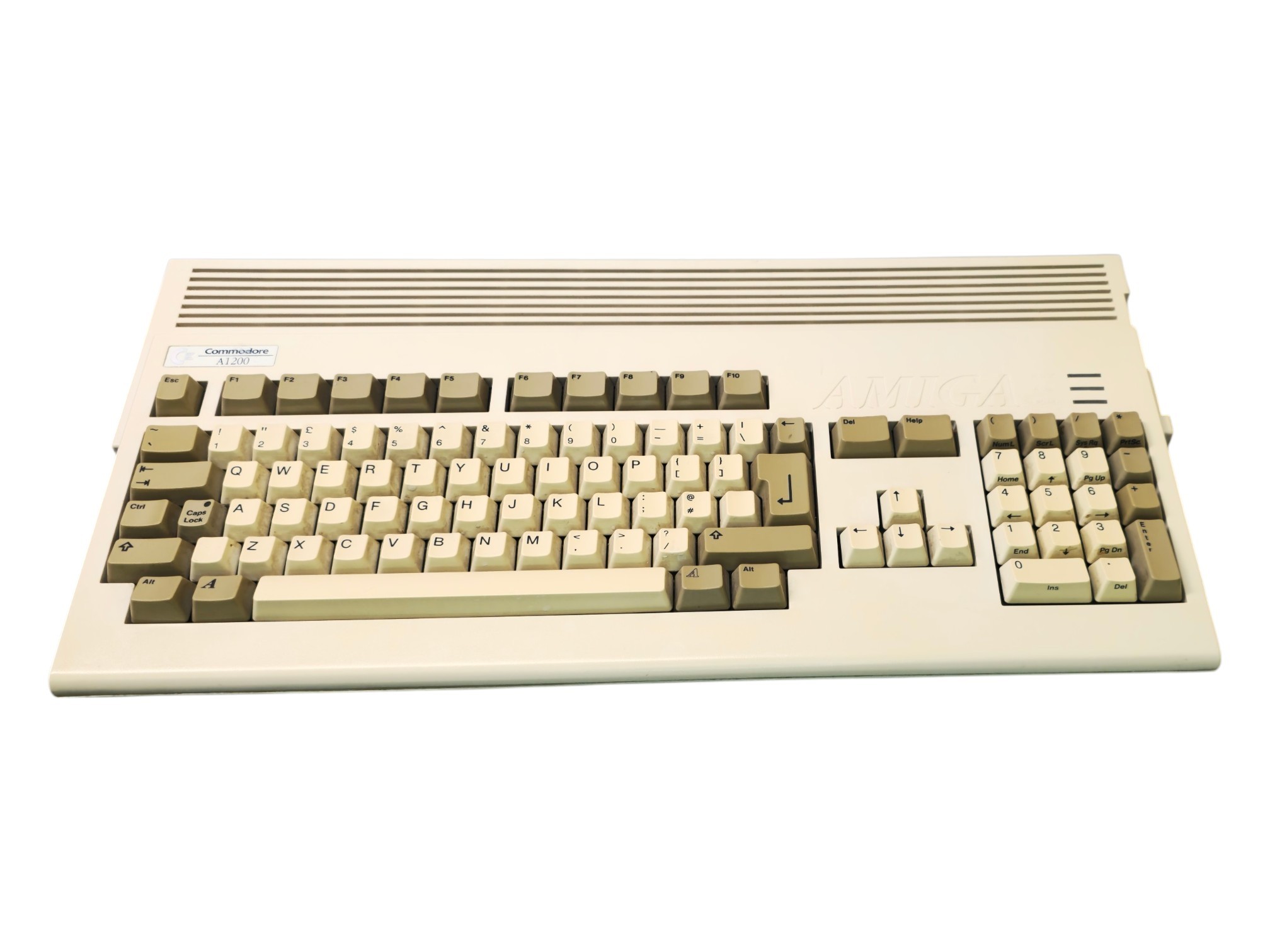
The Commodore Amiga 1200 – Kingston CompactFlash Mod represents a fascinating combination of classic home computing and modern storage technology. Based on Commodore’s legendary Amiga 1200, originally released in 1992, this upgraded system demonstrates how contemporary solid-state storage can extend the practical lifespan of one of the most influential multimedia computers of the 1990s.
By incorporating Kingston CompactFlash technology, the Amiga 1200 can benefit from convenient digital storage, improved file management, and reduced dependence on ageing mechanical hard drives and floppy disks.
The modification preserves the historic computing architecture of the original Amiga while introducing technology that makes the system more practical for modern retro computing enthusiasts.
With its Motorola 68EC020 processor, Advanced Graphics Architecture (AGA), distinctive Paula sound system, and sophisticated AmigaOS environment, the Amiga 1200 remains a remarkable computer more than three decades after its introduction.
The CompactFlash modification demonstrates how the dedication of the Amiga community continues to keep this extraordinary platform alive.
📘 Introduction
Released in October 1992, the Commodore Amiga 1200 represented the final major home-oriented Amiga computer introduced during Commodore International’s original existence.
The machine combined a more powerful Motorola processor with advanced graphics, expanded memory, and a sophisticated multitasking operating system.
One of its most important improvements over earlier Amiga home computers was the inclusion of an internal IDE interface.
This allowed users to connect compatible hard drives without requiring expensive external storage controllers.
At the time, conventional magnetic hard drives represented a significant improvement over floppy disk storage.
However, mechanical hard drives contain moving components that can deteriorate after decades of use.
Modern CompactFlash technology provides an alternative.
Through a compatible interface, a CompactFlash card can function as a storage device for the original Amiga.
This allows classic software, documents, games, and operating system files to be stored on modern flash memory.
The Kingston CompactFlash Mod therefore represents a practical connection between the computing technologies of the early 1990s and the storage technologies developed in subsequent decades.
🏭 The Commodore Amiga 1200: A Classic Reborn
The Amiga 1200 was introduced as the successor to Commodore’s enormously successful Amiga 500 family.
It retained the familiar keyboard-style enclosure while introducing several technological improvements.
These included:
- A Motorola 68EC020 processor
- Advanced Graphics Architecture
- 2 MB of Chip RAM
- A 16.8-million-colour palette
- Improved graphics performance
- Internal IDE storage support
- A PCMCIA expansion slot
- AmigaOS 3.0
- Greater processor and memory expansion possibilities
These features made the A1200 one of the most advanced home computers in Commodore’s consumer range.
An Expandable Architecture
Unlike many closed gaming consoles, the Amiga 1200 was designed to support numerous hardware expansions.
Over the years, enthusiasts developed solutions involving:
- Faster processors
- Additional memory
- Hard disk storage
- Networking
- Graphics enhancements
- Audio upgrades
- Modern digital storage
- Alternative video output
This expandability helped the A1200 remain useful long after its original commercial production ended.
The Continuing Amiga Community
Following Commodore’s bankruptcy in 1994, the Amiga community continued developing software, repairing hardware, and creating new expansion devices.
Modern CompactFlash upgrades belong to this tradition.
They demonstrate how vintage computers can remain operational through carefully chosen contemporary components.
🖥️ The Classic Amiga 1200 Design
The CompactFlash modification does not inherently require changing the Amiga 1200’s external appearance.
The original system features a low-profile, integrated keyboard enclosure that remains instantly recognisable.
Original Design Features
- Integrated computer and keyboard
- Full-size keyboard with numeric keypad
- Built-in 3.5-inch floppy disk drive
- External power supply
- Two nine-pin controller ports
- RGB video connection
- Composite video output
- Stereo RCA audio outputs
- PCMCIA expansion slot
- Internal IDE interface
- Bottom processor expansion connector
The computer’s light-coloured enclosure reflects the industrial design of the early 1990s.
Modern Technology Inside Vintage Hardware
One of the main attractions of a CompactFlash upgrade is that it can be installed without fundamentally altering the original computer’s appearance.
A compatible internal IDE adapter can allow flash storage to operate inside the enclosure.
Alternatively, PCMCIA adapters can provide convenient removable storage access through the external expansion slot.
The result can preserve the Amiga’s original appearance while making file storage and software management considerably more convenient.
⚙️ Technical Specifications
The Commodore Amiga 1200 – Kingston CompactFlash Mod combines the original computer architecture with modern removable flash storage.
Original Commodore Hardware
- Manufacturer: Commodore International
- Model: Amiga 1200
- Original release: 1992
- CPU: Motorola 68EC020
- Processor architecture: 32-bit
- CPU frequency: Approximately 14.18 MHz (PAL)
- Standard RAM: 2 MB Chip RAM
- Graphics chipset: Advanced Graphics Architecture (AGA)
- Graphics palette: 16.8 million colours
- Standard indexed colours: Up to 256 simultaneously
- Sound: Paula four-channel 8-bit PCM stereo
- Original storage: 3.5-inch double-density floppy drive
- Floppy capacity: 880 KB
- Internal storage interface: 44-pin IDE
- External expansion: 16-bit PCMCIA Type II
- Original operating system: AmigaOS 3.0
- Original desktop: Workbench 3.0
- Video: RGB and composite
- Audio: Stereo RCA
Kingston CompactFlash Modification
- Storage manufacturer: Kingston
- Storage technology: CompactFlash
- Memory type: Non-volatile flash memory
- Mechanical components: None
- IDE operation: Supported through compatible True IDE functionality and adapter hardware
- PCMCIA operation: Possible with suitable adapter and software configuration
- Storage capacity: Depends on the installed Kingston card
- Boot support: Available when appropriately configured as a compatible IDE device
- Operating system compatibility: Dependent on the AmigaOS version and storage configuration
- Power consumption: Generally lower than traditional mechanical hard drives
- Noise: Silent during normal operation
The CompactFlash upgrade does not automatically increase the computer’s CPU speed, graphics capabilities, or RAM.
Its primary function is to modernise the storage system.
💾 What Is CompactFlash?
CompactFlash (CF) is a removable flash memory format introduced by SanDisk in 1994.
Originally developed for portable electronics, CompactFlash became widely used in digital cameras, industrial equipment, embedded systems, and specialised computing applications.
Unlike traditional magnetic hard drives, CompactFlash cards store data electronically.
They contain no spinning platters or moving read/write heads.
CompactFlash Advantages
- Solid-state construction
- No mechanical moving parts
- Silent operation
- Low power consumption
- Compact physical dimensions
- Resistance to mechanical shock
- Convenient removable storage
- Compatibility with suitable ATA interfaces
A Technology That Bridges Generations
CompactFlash is particularly interesting for retro computing because many cards support an ATA-compatible operating mode.
This allows them to communicate with certain older computer interfaces through relatively simple adapters.
As a result, hardware originally designed for conventional IDE hard drives can sometimes use CompactFlash storage instead.
The Amiga 1200 is one of the best-known examples of this approach.
Why CompactFlash Became Popular with Amiga Users
The A1200’s internal IDE interface makes it relatively straightforward to connect a compatible CF adapter.
This allows original hardware to benefit from a storage technology developed after the computer’s release.
The modification has become a popular solution among enthusiasts restoring and modernising classic Amiga systems.
💙 Kingston CompactFlash: Modern Storage for Classic Hardware
Kingston is a well-known manufacturer of computer memory and storage products.
The company’s CompactFlash cards have been used in applications ranging from digital photography to specialised electronic systems.
In retro computing, compatible Kingston CF cards can provide a practical storage medium for classic hardware.
Why Use a Kingston CompactFlash Card?
Potential advantages include:
- Non-mechanical data storage
- Silent operation
- Convenient file management
- Lower power requirements than many older hard drives
- Easy replacement when using accessible adapters
- Compatibility with suitable IDE storage systems
Compatibility Considerations
Not every CompactFlash card behaves identically when connected to vintage computers.
Compatibility can depend on:
- Card model
- Storage capacity
- ATA implementation
- Adapter electronics
- Operating system version
- Filesystem configuration
- Partition layout
- Motherboard and interface compatibility
Some cards may work immediately, while others require additional configuration or may not function reliably with a particular adapter.
An Important Distinction
The Kingston brand identifies the storage manufacturer, not necessarily the manufacturer of the adapter or modification kit.
The exact Kingston card model and capacity determine the specific storage characteristics of an individual installation.
For museum documentation, these details can help distinguish one upgraded Amiga from another.
🔌 Connecting CompactFlash Through IDE
One of the most common methods of using CompactFlash storage with the Amiga 1200 is through the computer’s built-in IDE interface.
The original A1200 includes a 44-pin IDE connector designed for compatible 2.5-inch hard drives.
How the Connection Works
A compatible CompactFlash card supports ATA commands through its True IDE operating mode.
A suitable CF-to-IDE adapter provides the physical connection between the card and the computer’s IDE interface.
The arrangement typically consists of:
- Amiga 1200 motherboard
- Internal 44-pin IDE connector
- Compatible CF-to-IDE adapter
- CompactFlash card
The Amiga Sees a Storage Device
When properly configured, the CompactFlash card can appear to the Amiga as a conventional IDE storage device.
This allows the operating system to access it using established storage routines.
Bootable CompactFlash Storage
A compatible CF card can be prepared with:
- An appropriate partition table
- An Amiga-compatible filesystem
- Bootable operating system files
- Workbench
- Applications
- Games
- Utilities
Once properly configured, the system can boot from the card without requiring a Workbench floppy disk.
The Advantages
An internal CF installation can provide:
- Convenient system startup
- Reduced dependence on floppy disks
- Silent storage operation
- Faster file access
- Improved everyday usability
- Easier software organisation
However, the actual performance remains limited by the Amiga’s original IDE controller and processor.
A modern CompactFlash card does not automatically provide the transfer speeds associated with modern computers.
💳 PCMCIA: An Alternative Way to Use CompactFlash
The Amiga 1200 also includes a 16-bit PCMCIA Type II slot.
This interface provides another way to access compatible CompactFlash cards.
Unlike internal IDE storage, PCMCIA-based CompactFlash solutions are frequently used for transferring files between the Amiga and other computers.
PCMCIA CompactFlash Setup
A typical arrangement involves:
- Amiga 1200 PCMCIA slot
- Compatible PCMCIA-to-CompactFlash adapter
- CompactFlash memory card
- Appropriate Amiga software and filesystem support
Common Applications
PCMCIA CompactFlash storage can be useful for:
- Copying files
- Transferring software
- Moving documents
- Importing images
- Managing archives
- Backing up selected data
- Exchanging files with other systems
IDE vs. PCMCIA
The distinction is important.
An internal IDE CompactFlash card can replace a conventional hard drive and serve as a boot device.
A PCMCIA CompactFlash card is commonly used as removable storage or a file-transfer medium.
The PCMCIA slot does not automatically provide the same conventional boot behaviour as an internal IDE device.
Additional hardware or software arrangements may be required for specialised uses.
Preservation Benefits
PCMCIA adapters can be particularly attractive because they may allow additional storage functionality without opening or permanently modifying the computer.
For collectors seeking reversible upgrades, this can be an important advantage.
⚡ CompactFlash vs. Traditional Mechanical Hard Drives
One of the main reasons CompactFlash became popular among Amiga enthusiasts was the ageing of original mechanical hard drives.
Traditional hard drives use rotating magnetic platters and movable read/write heads.
These components can deteriorate over time.
Traditional IDE Hard Drive
- Contains moving components
- Generates mechanical noise
- Requires motor operation
- Produces vibration
- Can be vulnerable to shock
- Has mechanical wear mechanisms
- May eventually develop motor or head failures
CompactFlash Storage
- No spinning platters
- No mechanical read/write head
- Silent operation
- Low mechanical complexity
- Resistant to ordinary movement and vibration
- Compact physical design
- Uses electronic flash memory
A Different Kind of Reliability
CompactFlash eliminates many mechanical failure modes.
However, flash memory is not indestructible.
Cards can still experience:
- Controller failure
- Flash memory wear
- Data corruption
- Electrical damage
- Compatibility problems
- Data-retention degradation
Therefore, CompactFlash should not be considered a permanent storage solution requiring no maintenance.
Regular backups remain essential.
🚀 Faster Startup & Improved Everyday Usability
One of the most noticeable practical improvements of suitable solid-state storage is the elimination of mechanical seek delays.
A conventional hard drive must physically move its read/write heads to locate data.
A CompactFlash card accesses information electronically.
Potential Benefits
- Faster access to many small files
- Reduced mechanical delays
- Silent program loading
- More convenient startup
- Easier application management
- Reduced floppy disk swapping
The Limits of Original Hardware
The Amiga 1200 was developed in 1992.
Its IDE interface is considerably slower than modern storage controllers.
Consequently, using an extremely fast CompactFlash card does not necessarily produce significantly faster transfer speeds.
The original IDE controller remains an important limitation.
Why the Upgrade Still Matters
The real advantage of CompactFlash is not simply maximum transfer speed.
It is the combination of:
- Convenience
- Reliability
- Quiet operation
- Compact size
- Reduced mechanical wear
- Easier storage management
For everyday retro computing, these practical benefits can be more important than theoretical performance figures.
🖱️ Workbench & AmigaOS on CompactFlash
One of the most useful applications of internal CompactFlash storage is installing the Amiga operating system directly onto the card.
The original Amiga 1200 normally shipped with AmigaOS 3.0.
Its graphical desktop was called Workbench.
The Workbench Environment
Workbench provides:
- Graphical windows
- Icons
- File management
- Mouse-based navigation
- Application launching
- Disk management
- System configuration
- Multitasking support
Booting from Modern Storage
With a correctly prepared internal IDE CompactFlash card, an Amiga 1200 can load a compatible operating system from solid-state storage.
This removes the need to insert a Workbench floppy disk for normal startup.
Available Operating System Versions
Depending on the installed Kickstart ROM and software configuration, enthusiasts may use versions such as:
- AmigaOS 3.0
- AmigaOS 3.1
- AmigaOS 3.1.4
- AmigaOS 3.2
Not every version is suitable for every unmodified configuration.
Some upgrades require additional memory, specific ROM versions, or other components.
A More Convenient Classic Computer
Modern storage makes it easier to maintain a structured software environment.
Users can organise applications, documents, games, music, and utilities into directories.
This allows the Amiga 1200 to function more like a conventional hard-disk-based computer while retaining its original operating environment.
🎮 WHDLoad: Classic Amiga Gaming Without Constant Disk Swapping
One of the most important software developments in modern Amiga preservation is WHDLoad.
WHDLoad allows many classic Amiga games and demonstrations originally designed to run from floppy disks to operate from hard disk or compatible solid-state storage.
The Original Floppy Disk Experience
Many classic Amiga games required users to insert one or more floppy disks.
Larger games could require several disk changes.
Some software also relied on specific hardware behaviour that made conventional hard disk installation difficult.
How WHDLoad Helps
WHDLoad uses specialised installation and execution components to support compatible games.
Depending on the title, it can provide:
- Hard disk installation
- Reduced floppy disk dependence
- Compatibility fixes
- Improved launching convenience
- Support for selected hardware configurations
- Optional preloading of game data
Popular Games with WHDLoad Installers
Examples from the wider Amiga software library include:
- Turrican
- Turrican II
- Shadow of the Beast
- The Secret of Monkey Island
- Monkey Island 2
- Lemmings
- Sensible Soccer
- Cannon Fodder
- Another World
- Flashback
- Speedball 2
- The Chaos Engine
- Lotus Turbo Challenge 2
- Rick Dangerous
- Superfrog
Individual games require suitable WHDLoad installations and legally obtained game data.
Memory Requirements
One important consideration is that WHDLoad does not eliminate hardware limitations.
Some game installations require additional Fast RAM or other resources.
An Amiga 1200 with only its original 2 MB Chip RAM may not have enough memory for every installation or preload configuration.
Memory expansion can therefore be particularly useful.
CompactFlash & WHDLoad
CompactFlash storage provides a convenient location for organising installed games.
When combined with suitable memory and software, it can make the A1200 significantly easier to use for classic gaming.
The storage modification itself does not automatically mean WHDLoad is installed or that every game will run.
🎨 AGA Graphics Remain Completely Authentic
One of the most important aspects of a storage-only CompactFlash modification is that it does not replace the original graphics architecture.
The Amiga 1200 continues using its Advanced Graphics Architecture (AGA) chipset.
Original AGA Capabilities
- 24-bit colour palette
- Approximately 16.8 million possible colours
- Up to 256 indexed colours simultaneously
- HAM8 graphics
- Hardware sprite support
- Blitter operations
- Copper effects
- Multiple video modes
Original Graphics Hardware
The AGA chipset includes important custom components such as:
- Alice
- Lisa
- Paula
These chips continue handling graphics, memory coordination, sound, and other system functions.
What the CompactFlash Mod Does Not Change
A storage modification does not inherently alter:
- Native graphics resolution
- Available colour palette
- Processor performance
- Hardware sprite capabilities
- Original graphics timing
- Game rendering algorithms
The visual experience remains dependent on the underlying Amiga hardware.
The CompactFlash card simply provides a more convenient method of storing and accessing software.
This is one of the main reasons such modifications are attractive to enthusiasts seeking an authentic retro computing experience.
🎵 Paula: The Original Amiga Sound Experience
The CompactFlash modification also preserves the Amiga 1200’s original audio hardware.
The system uses the famous Paula sound chip, which provides four channels of sampled audio.
Audio Capabilities
- Four independent PCM channels
- 8-bit digital samples
- Stereo output
- Programmable playback frequencies
- Independent channel volume control
- Sample-based instruments
- Digital sound effects
The Legendary Amiga Sound
Classic Amiga games featured memorable sampled music and effects.
Examples include:
- Turrican II
- Shadow of the Beast
- Lotus Turbo Challenge 2
- The Chaos Engine
- Alien Breed
- Super Stardust
- Sensible World of Soccer
The distinctive Paula sound remains an important part of the Amiga experience.
Original Audio with Modern Storage
A Kingston CompactFlash card does not inherently replace or emulate the original audio chipset.
Music and sound continue to be generated by the historic hardware.
This allows users to enjoy the benefits of modern storage while preserving the characteristic sound of the Amiga.
💻 Programming, Productivity & Creative Applications
The Amiga 1200 was designed as a general-purpose multimedia computer.
Its capabilities extended far beyond gaming.
CompactFlash storage can make it easier to maintain and organise large collections of applications.
Productivity Software
The Amiga ecosystem included:
- Word processors
- Spreadsheets
- Database applications
- Desktop publishing programs
- File management utilities
- Communications software
Applications such as Wordworth, Final Writer, and Directory Opus became popular among Amiga users.
Graphics & Animation
Creative software included:
- Deluxe Paint
- Personal Paint
- Brilliance
- Scala Multimedia
- Various animation tools
These applications demonstrated the Amiga’s strong multimedia capabilities.
Music Production
The platform also supported influential music software such as:
- ProTracker
- OctaMED
- Soundtracker
- Sample editing applications
Advantages of CompactFlash
Solid-state storage can provide convenient space for:
- Application files
- Fonts and libraries
- Music modules
- Sample libraries
- Digital artwork
- Documents
- Archived projects
The additional convenience makes the upgraded A1200 particularly useful for enthusiasts who want to explore the creative software ecosystem of the original Amiga.
🕹️ Classic Games & the A1200 Software Library
The Amiga 1200 inherited much of the software library established by earlier Amiga computers.
It also introduced support for games designed to exploit the AGA chipset.
Classic Amiga Games
- Turrican
- Turrican II
- Shadow of the Beast
- Shadow of the Beast II
- Lemmings
- Lemmings 2
- Cannon Fodder
- Sensible Soccer
- Sensible World of Soccer
- The Secret of Monkey Island
- Monkey Island 2
- Another World
- Flashback
- Speedball 2
- The Chaos Engine
- Lotus Turbo Challenge 2
- Rick Dangerous
- Superfrog
Notable AGA Titles
- Banshee
- Super Stardust
- Alien Breed 3D
- Alien Breed II
- Alien Breed: Tower Assault
- Pinball Illusions
- Slam Tilt
- Worms: The Director’s Cut
- Gloom
- Fears
- Brian the Lion
- Zool 2
Compatibility Considerations
Not every Amiga game is compatible with every hardware configuration.
Some older games rely on:
- Specific Kickstart versions
- Original chipset timing
- Particular memory arrangements
- Direct hardware access
- Floppy disk boot behaviour
WHDLoad and other compatibility solutions can help with many titles.
However, the Kingston CompactFlash modification alone does not guarantee compatibility with all Amiga software.
🗂️ Partitions, Filesystems & Storage Configuration
Using modern storage with a vintage computer requires more than simply inserting a memory card.
The Amiga must be able to recognise and access the storage device.
Preparing a CompactFlash Card
An IDE-connected card may require:
- Device identification
- Partition configuration
- Filesystem setup
- Boot priority configuration
- Operating system installation
Amiga Filesystems
Traditional Amiga systems commonly used the Fast File System (FFS).
Later software and third-party solutions introduced additional options.
These include:
- Fast File System
- Professional File System (PFS)
- Smart File System (SFS)
Each filesystem has different capabilities and compatibility requirements.
Storage Capacity Limitations
Original Amiga operating systems and storage drivers were developed when hard disks were much smaller.
This created limitations involving:
- Partition sizes
- Addressing
- Filesystem compatibility
- Driver versions
- Large disk support
Certain older configurations encounter important limits around the 4 GB addressing boundary.
However, these limitations depend on the actual operating system, controller, driver, and filesystem combination.
They should not be interpreted as a universal physical 4 GB limit for every Amiga 1200.
Why Correct Configuration Matters
Incorrect storage configuration can result in:
- Data corruption
- Missing partitions
- Boot failures
- Unreliable file transfers
- Inaccessible storage
- Filesystem errors
For a restored vintage computer, careful storage preparation is essential.
🔄 Transferring Files Between Amiga & Modern Computers
One of the most useful benefits of CompactFlash technology is the possibility of transferring files between vintage and modern systems.
The original Amiga 1200 was developed before USB flash drives, cloud storage, and modern networking became widespread.
CompactFlash can help bridge this technological gap.
Possible Transfer Methods
Depending on the storage configuration, users may employ:
- PCMCIA CompactFlash adapters
- Compatible USB CompactFlash readers on modern computers
- Dedicated Amiga file-transfer utilities
- Amiga-compatible disk image tools
- Networking solutions
Important Filesystem Differences
Modern Windows computers do not normally recognise Amiga-formatted partitions as ordinary Windows volumes.
Likewise, an Amiga does not automatically recognise every modern filesystem.
Specialised tools or correctly configured transfer cards may be required.
Using FAT-Formatted Cards
With appropriate PCMCIA adapters and Amiga software, FAT-formatted CompactFlash cards can be useful for exchanging files.
This can be particularly convenient for transferring:
- LHA archives
- Documentation
- Images
- Music modules
- Utilities
- Software installers
A Connection Between Computing Eras
CompactFlash allows enthusiasts to combine the convenience of modern file handling with authentic vintage hardware.
For museum preservation, this can make the process of maintaining and demonstrating original systems considerably easier.
🔐 Data Preservation & Backup Strategies
Modern storage improves convenience, but long-term data preservation still requires careful planning.
CompactFlash cards contain electronic memory cells and controller circuitry.
These components can fail.
Why Backups Matter
Potential problems include:
- Unexpected card failure
- Filesystem corruption
- Accidental deletion
- Electrical damage
- Age-related degradation
- Incorrect partition configuration
Creating Backups
Suitable backup approaches may include:
- Copying important files
- Creating disk images
- Preserving partition information
- Recording operating system versions
- Maintaining spare compatible media
- Storing backups on separate modern devices
Preserving Original Software
Original game and application data should be maintained in accordance with applicable software rights.
For historical preservation, authentic disk images and original media are particularly valuable.
They help document how software was originally distributed.
Documenting the Modification
Useful information includes:
- Kingston CompactFlash model
- Storage capacity
- Adapter type
- IDE or PCMCIA connection
- Partition layout
- Installed AmigaOS version
- Kickstart version
- Filesystem
- Date of modification
- Original storage components retained
This documentation can make future maintenance and restoration significantly easier.
🔄 Original Amiga 1200 vs. Kingston CompactFlash Mod
The original Amiga 1200 and a CompactFlash-upgraded version share the same underlying computing platform.
However, their everyday operation can be noticeably different.
Original Commodore Amiga 1200
- Released in 1992
- Motorola 68EC020 processor
- AGA graphics
- 2 MB Chip RAM
- Traditional floppy disk storage
- Optional IDE hard disk
- Original operating system environment
- Mechanical storage options
- Historic factory configuration
Amiga 1200 – Kingston CompactFlash Mod
- Original Amiga 1200 hardware platform
- Kingston CompactFlash storage
- Modern non-volatile memory
- No mechanical movement within the CF card
- Potential for bootable IDE storage
- Convenient application organisation
- Reduced dependence on ageing mechanical drives
- Easier data backup and transfer with suitable tools
- Original processor and graphics capabilities retained
The Most Important Difference
The CompactFlash modification does not create a new generation of Amiga hardware.
Instead, it modernises one practical part of the original system.
This makes the machine easier to maintain and operate while preserving its historic character.
For collectors, it demonstrates how technology from different decades can work together.
🔧 Maintenance & Long-Term Reliability
Although CompactFlash eliminates mechanical wear within the storage medium, the rest of the Amiga 1200 remains vintage electronic hardware.
Original components may still require maintenance.
Common Maintenance Areas
- Motherboard capacitors
- Power supply
- Keyboard contacts
- Floppy disk drive
- PCMCIA connector
- IDE interface
- Audio circuits
- Video connectors
- Expansion slots
- CompactFlash adapter connections
Motherboard Capacitors
The Amiga 1200 contains surface-mounted electrolytic capacitors.
After several decades, these may deteriorate or leak.
Leaking electrolyte can damage circuit-board traces and surrounding components.
Professional capacitor replacement is therefore an important consideration when restoring original A1200 hardware.
CompactFlash Connections
A poorly seated adapter or incorrect cable orientation may cause storage errors.
The IDE interface must be connected correctly.
Improper cable orientation or electrical contact can damage hardware.
Power Supply Stability
The computer requires a correctly specified power supply.
Old or unstable power supplies should be inspected before use.
Safe Handling
Internal IDE CompactFlash cards should not be removed while the computer is powered on.
Removable PCMCIA arrangements should also be handled according to the requirements of the installed hardware and software.
For long-term preservation, the computer should be powered down safely before internal storage components are disconnected.
🌍 The Modern Amiga Restoration Community
The Amiga 1200 has one of the most enthusiastic communities in vintage computing.
Despite the end of Commodore’s original manufacturing operations in 1994, the platform continues to attract developers, collectors, and hardware enthusiasts.
Popular Restoration Activities
- Motherboard repairs
- Capacitor replacement
- Power supply restoration
- Keyboard refurbishment
- Floppy drive maintenance
- CompactFlash installation
- Memory upgrades
- Processor accelerator installation
- Modern video output modifications
New Hardware for Old Computers
The continuing popularity of the Amiga has encouraged the development of modern expansion devices.
These include:
- IDE storage adapters
- CompactFlash interfaces
- SD-based storage systems
- Networking hardware
- Processor accelerators
- Video converters
- Replacement keyboards
- Modern memory expansions
A Living Computing Platform
Unlike many obsolete consumer electronics products, the Amiga continues to receive new community-developed software and hardware.
This ongoing activity is one of the most remarkable aspects of its history.
The Kingston CompactFlash modification belongs to this wider tradition of preserving and extending the capabilities of classic systems.
🇬🇷 Amiga Computing & Preservation in Greece
The Amiga family developed a strong following in Greece during the late 1980s and early 1990s.
The Amiga 500 introduced many users to advanced graphics, sampled stereo sound, and sophisticated computer gaming.
The Amiga 1200 later offered greater performance and improved graphical capabilities.
The Greek Amiga Experience
The platform became associated with:
- Classic computer gaming
- Joystick-based entertainment
- Digital music
- Computer graphics
- Programming
- Software experimentation
- Hardware expansion
The Importance of Modern Storage
As original floppy disks and mechanical hard drives age, modern storage solutions can help preserve functioning Amiga systems.
CompactFlash technology is particularly suitable because of its compatibility with conventional ATA-based storage interfaces.
Preserving Computing History
Restored and upgraded Amiga systems allow new generations to experience original hardware.
They also demonstrate the transition from magnetic storage technologies to modern flash memory.
For a technology museum, this provides an opportunity to explain how computers can remain useful decades after their original release.
⭐ Why the Kingston CompactFlash Mod Still Matters
The Commodore Amiga 1200 – Kingston CompactFlash Mod represents an important example of successful retro computing modernisation.
Its significance includes:
- Preserving original Amiga 1200 hardware
- Reducing dependence on ageing mechanical storage
- Demonstrating ATA and CompactFlash compatibility
- Improving everyday software management
- Supporting convenient operating system installations
- Helping preserve classic applications and games
- Making data backup more practical
- Maintaining the original AGA graphics and Paula audio
- Illustrating the continued activity of the Amiga community
- Connecting computing technologies from different generations
Technology Beyond Its Original Lifespan
The Amiga 1200 was designed in an era dominated by floppy disks and relatively small mechanical hard drives.
Modern CompactFlash storage demonstrates how a well-designed computer architecture can continue operating with later technologies.
Preservation Through Practical Modernisation
For collectors who regularly use their vintage computers, carefully selected storage upgrades can reduce wear on original mechanical components.
At the same time, retaining the original motherboard, processor, graphics, and audio hardware helps preserve the essential characteristics of the machine.
The result is a balance between historical authenticity and practical usability.
🏛️ Collectability & Historical Preservation
A CompactFlash-modified Amiga 1200 occupies a distinct place within a vintage computer collection.
It combines authentic Commodore hardware with a modern storage component.
Important Collecting Considerations
- Original Commodore Amiga 1200 motherboard
- Original enclosure
- Genuine keyboard
- Motherboard revision
- Kickstart ROM version
- Installed memory
- Kingston CompactFlash model
- CompactFlash capacity
- Adapter manufacturer
- Storage connection method
- Operating system configuration
- Functional condition
- Original components retained
Originality vs. Modern Convenience
A completely original Amiga 1200 provides an authentic representation of Commodore’s factory hardware.
A CompactFlash-upgraded model offers a different perspective.
It demonstrates how enthusiasts have adapted the computer for continued use.
Neither approach replaces the historical importance of the other.
Reversible Modifications
For museum preservation, reversible upgrades are particularly attractive.
They allow the original system to be restored to an earlier configuration without permanently changing the historic hardware.
Where possible, removed components should be labelled and preserved.
A Valuable Comparison Exhibit
Displaying an original Amiga 1200 alongside a CompactFlash-upgraded example can demonstrate the evolution of storage technology.
Visitors can compare:
- Floppy disk storage
- Mechanical hard drives
- CompactFlash memory
- Traditional boot procedures
- Modernised storage workflows
This provides a practical illustration of how computing technology has changed over several decades.
📦 Items Included in This Collection Entry
🏁 Conclusion
The Commodore Amiga 1200 – Kingston CompactFlash Mod represents a remarkable meeting of classic computing heritage and modern storage technology.
By combining Commodore’s influential 1992 home computer architecture with Kingston CompactFlash memory, the upgraded system demonstrates how contemporary components can improve the practicality and longevity of vintage hardware.
The original Motorola 68EC020 processor, AGA graphics chipset, Paula stereo sound system, and sophisticated AmigaOS environment remain central to the experience.
CompactFlash storage provides a convenient alternative to ageing mechanical drives, making it easier to organise software, maintain files, and enjoy compatible classic applications.
When combined with suitable operating system configurations and tools such as WHDLoad, modern storage can also make the Amiga’s extensive software library considerably more accessible.
The modification does not change the historical capabilities of the original computer.
Instead, it helps preserve them.
More than three decades after the Amiga 1200’s introduction, the continuing development of modern storage adapters, expansion devices, and software tools demonstrates the extraordinary dedication of the Amiga community.
The Kingston CompactFlash modification is therefore more than a simple hardware upgrade.
It represents the ongoing effort to keep historic computer technology functional, accessible, and relevant for future generations.
A perfect combination of Commodore’s legendary multimedia architecture and modern solid-state storage, the Amiga 1200 Kingston CompactFlash Mod is a fascinating example of how classic computers can continue evolving long after their original production.
